Product Design & Management Masterclass:

- Description
- Curriculum
- FAQ
- Notice
- Reviews
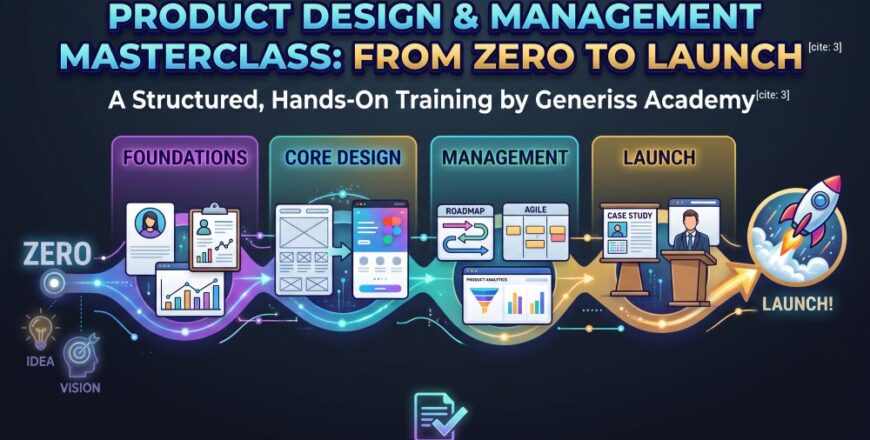
Offered by Generiss Academy, the Product Design & Management Masterclass: From Zero to Launch is a structured, hands-on program designed to transform learners into end-to-end digital product practitioners. Rather than separating design from strategic execution, this course unifies product thinking, user experience (UX) design, high-fidelity user interface (UI) design in Figma, and product management methodology into a single learning journey.
Throughout the course, participants continuously develop a single product idea from initial concept validation through Figma prototyping, MVP scoping, product roadmapping, and analytics measurement. Every weekly assignment directly feeds into a practical capstone project, equipping students with a structured, professional case study ready for tech portfolio.
The Product Design & Management Masterclass: From Zero to Launch curriculum spans twelve structured modules divided across four learning phases, designed to take participants from basic product concepts to a portfolio-ready capstone project.
-
Program Structure: 12 Modules across 4 Core Learning Phases
-
Learning Approach: Weekly take-home assignments (2–4 hours) and continuous single-product development
-
Key Capstone Deliverable: Portfolio-ready product case study
-
1
 Video 1: Product Thinking & Introduction
 -
2
 1.1. Introduction & What is a Product?
By the end of this module, you will be able to define what a digital product is, distinguish between different types of digital products, analyze a live product's components, and describe the stages of a product's lifecycle.
-
3
1.2. Live Product Breakdown
-
4
1.3. Types of Digital Products
-
5
1.4. The Product Lifecycle
-
6
1.5. Summary & Key Takeaways
-
7
 1.6. Knowledge Check & Discussion Prompts
 -
8
 Quiz 1: Product Thinking & Introduction
-
9
Video 2: Users & Problem Definition
-
10
2.1: Why Users Matter - The Foundation of Everything
Welcome to Module 2! In Module 1, we explored what product management is and the product lifecycle. Now, we’re going to dive into the most critical part of the entire process: understanding the user.
Many products fail, not because of poor technology or execution, but because they solve a problem no one has, or they solve it in a way that doesn't fit into a user's life. This module is about making sure that doesn't happen to you.
By the end of this module, you will be able to:
-
Articulate why a deep understanding of users is the foundation of successful product design.
-
Describe the core concepts of user research and its primary methods.
-
Define and differentiate between user pain points and user needs.
-
Create a foundational User Persona to represent a target user.
-
Build a User Journey Map to visualize and analyze the user's experience.
-
-
11
2.2: User Research Basics - Listening Before You Build
-
12
2.3: Pain Points & User Needs - What to Look For
-
13
2.4: User Personas - Creating Fictional Stand-Ins for Your Real Users
-
14
2.5: User Journey Mapping - Stepping into the User's Shoes
-
15
2.6. Summary
Module 2 Summary
Congratulations! You've completed the foundational module on users and problem definition. Let's recap the key takeaways:
-
Users are the foundation: Building for yourself is a path to failure. Build for your users.
-
Do user research: It's the compass that guides your product. Start with generative research (interviews, observations) to discover problems.
-
Identify Pain Points and User Needs: A pain point is a specific problem (e.g., "I lose my notes"). A user need is the underlying goal (e.g., "I need a reliable system to feel organized"). Your product bridges the two.
-
Create User Personas: They are fictional, research-backed summaries of your target users. They make your users "real" for the entire team.
-
Map the User Journey: Visualize the user's step-by-step experience to understand their emotions and identify key opportunities for improving your product.
Module 2 Assignments
To solidify your learning, please complete the following assignments.
Assignment 1: Persona Creation
Objective: Practice synthesizing user research into a persona.
Scenario: You are the product manager for a new app called "PlantPal," designed to help people take care of their houseplants.
You have conducted 5 user interviews. Below are synthesized notes from those interviews. Create a single user persona based on this data.
Interview Notes:
-
User 1 (Aisha, 28): "I have a beautiful fern that is slowly dying. I water it, but I don't know if I'm watering it too much or not enough. I look at it, and it just looks droopy. I wish there was a simple guide that just told me what to do based on how it looks."
-
User 2 (Ben, 45): "My wife and I have around 20 plants. We're pretty good with them, but we travel a lot for work. When we're gone, they get neglected. We need a way to remember to water them before we leave, and a simple schedule for when we get back. The biggest pain is coming home to a dead plant."
-
User 3 (Carla, 22): "I just got my first apartment and bought a little succulent. I think they're supposed to be easy, but I'm terrified of killing it. I'm constantly googling 'how to care for a succulent' and getting conflicting advice. It's overwhelming."
-
User 4 (David, 52): "My wife passed away recently, and she was the green thumb. I inherited her plant collection and I have no idea what I'm doing. I don't even know what the different plants are called. I just want something simple that doesn't make me feel like a failure."
-
User 5 (Emma, 31): "I'm an avid plant collector, but I just don't have the time to hand-water them all with a measuring cup. I'm looking for an app that can help me automate reminders and keep track of who needs what. I'm very data-driven."
Instructions:
Based on the interview notes, fill in the following persona template for one of the user segments you see emerging. You may need to combine details from multiple users.Persona Name & Title: (e.g., Newbie Noah)
Quote: (A single sentence capturing their attitude)
Demographics: (Age, Location, Job, etc.)
Goals & Needs: (What are their functional and emotional needs?)
Pain Points: (What frustrates them?)
Behaviors & Habits: (How do they interact with plants and technology?)
Assignment 2: Journey Map
Objective: Learn to visualize a user experience and identify pain points.
Scenario: Think about a time you had to contact customer support for a product or service (e.g., an internet provider, an online store, a bank). Choose a specific example and create a simple 4-stage journey map.
Your scenario is: "I need to get a refund for a product I bought online that arrived damaged."
Instructions:
Create a table with the following columns: Stage, Actions, User's Thoughts & Feelings, Pain Points, Opportunities.-
Stage 1: Finding Help: (e.g., Navigates to the website, searches for "Contact Us").
-
Stage 2: Contacting Support: (e.g., Calls a phone number, waits on hold, explains the issue).
-
Stage 3: Resolution: (e.g., Is told they need to email a photo, has to pay for return shipping, etc.).
-
Stage 4: Follow-up: (e.g., Waits for a refund, receives an email confirmation).
Make sure you identify at least one "Pain Point" and one "Opportunity" for each stage.
-
-
16
2.7. Assignments
-
17
Quiz 2: Users & Problem Definition
-
18
Video 3: Market Research & Validation
-
19
3.1: What is Market Research and Why Does It Matter?
In Module 2, we learned how to understand our users' problems. We discovered that Alex needs a better way to capture tasks, and we built a persona around him. But before we write a single line of code for our To-Do List app, we need to answer a critical question: Is this a viable business opportunity?
You might have a brilliant solution to a user's pain point, but if the market is too small, too crowded, or impossible to reach, your product will fail. This module is about turning your user insights into a business case. It's about moving from "This is a problem users have" to "This is a problem worth solving for our business."
By the end of this module, you will be able to:
-
Define market research and explain its importance in product success.
-
Conduct a basic competitor analysis to understand the competitive landscape.
-
Apply practical market validation techniques to test your product idea before investing in building it.
-
-
20
3.2: Types of Market Research
-
21
3.3: Competitor Analysis - Understanding the Battleground
-
22
3.4: Market Validation - Testing Before You Build
-
23
3.5: A Step-by-Step Market Validation Process
-
24
3.6. Summary
-
25
3.7. Assignments
-
26
Quiz 3: Market Research & Validation
-
27
Video 4: Design Fundamentals (UI/UX)
-
28
4.1: UI vs. UX - The Yin and Yang of Product Design
In Modules 2 and 3, we learned who our users are, what problems they face, and whether our solution makes business sense. Now, we need to translate all of that understanding into a product that people can actually use. This is where design comes in.
Design is often misunderstood as just "making things look pretty." In product management, design is about functionality, clarity, and empathy. It's the bridge between the user's needs and the product's features. A beautifully designed product that is confusing to use is a failure. An ugly product that is incredibly intuitive can be a massive success (think of early Amazon or Craigslist).
By the end of this module, you will be able to:
-
Clearly articulate the difference between User Interface (UI) and User Experience (UX).
-
Apply fundamental design principles to create clear, usable interfaces.
-
Understand and implement basic accessibility guidelines to make your products usable by everyone.
-
-
29
4.2: Core Design Principles for Beginners
-
30
4.3: Accessibility Basics - Designing for Everyone
-
31
4.4: A Practical Example - Redesigning a Bad Experience
-
32
4.5. Summary
-
33
4.6. Assignments
-
34
Quiz 4: Design Fundamentals (UI/UX)
-
35
Video 5: Figma Basics & Wireframing(1)
-
36
Video 5: Figma Basics & Wireframing(2)
-
37
Video 5: Figma Basics & Wireframing(3)
-
38
5.1: Setting Up Your Figma Account
We've spent the last few modules understanding our users, validating our market, and learning the principles of good design. Now, it's time to get our hands dirty. This module is where we start to build. We'll take the user insights and design principles we've learned and translate them into tangible, visual structures using a powerful tool: Figma.
Figma has become the industry-standard design tool for a reason. It's free to start, works in your browser, and makes collaboration incredibly easy. But more importantly, it's a tool that allows you to communicate your ideas clearly to your team, your developers, and your stakeholders.
By the end of this module, you will be able to:
-
Navigate the Figma interface with confidence.
-
Understand and create User Flows to map out a user's journey through your product.
-
Translate user flows into low-fidelity wireframes.
-
Apply basic design principles within Figma to create clear, structured layouts.
-
-
39
5.2: The Figma Interface - A Guided Tour
-
40
5.3: User Flows - Mapping the Journey
-
41
5.4: Introduction to Wireframing
-
42
5.5: Wireframing in Figma - Building the "Add Task" Screen
-
43
5.6. Summary
-
44
5.7. Assignments
-
45
Quiz 5: Figma Basics & Wireframing
-
46
Video 6: Figma Mastery (Auto Layout & Components)(1)
-
47
Video 6: Figma Mastery (Auto Layout & Components)(2)
-
48
6.1: Auto Layout - The Magic of Smart, Responsive Design
In Module 5, we learned the basics of Figma and created our first wireframe. It was a great start, but as a product manager or designer, you'll quickly realize that designing individual screens is only half the battle. The real challenge is scalability—how do you build a design system that can grow to dozens or even hundreds of screens without becoming a chaotic mess?
This is where Auto Layout and Components come in. These are the two most powerful features in Figma. They are what separate beginners from professionals. Auto Layout makes your designs flexible and responsive, while Components make them reusable and consistent.
By the end of this module, you will be able to:
-
Use Auto Layout to create responsive, flexible frames that adapt to content changes.
-
Build and use Components to create a consistent, reusable design language.
-
Understand the principles of reusability in design systems.
-
Apply these skills to build a scalable and structured wireframe.
-
-
49
6.2: Components - The Building Blocks of Design Systems
-
50
6.3: Combining Auto Layout and Components
-
51
6.4: Building a Complete, Structured Wireframe
-
52
6.5: Reusability in Design Systems
-
53
6.6. Summary
-
54
6.7. Assignments
-
55
Quiz 6: Figma Mastery (Auto Layout & Components)
-
56
Video 7: UI Design, Prototyping & Dev Handoff Mindset (1)
-
57
Video 7: UI Design, Prototyping & Dev Handoff Mindset (2)
-
58
Video 7: UI Design, Prototyping & Dev Handoff Mindset (3)
-
59
Video 7: UI Design, Prototyping & Dev Handoff Mindset (4)
-
60
7.1: Visual Design Fundamentals - Making It Beautiful
Welcome to the final design module! Over the past six modules, we've learned about users, market validation, design principles, and the technical skills to structure our designs in Figma. Now, it's time to bring it all together.
This module is about polish and communication. We'll take our functional wireframes and turn them into beautiful, high-fidelity designs that reflect our brand and delight our users. Then, we'll make those designs interactive through prototyping, simulating the real app experience. Finally, and perhaps most importantly, we'll learn the developer handoff mindset—how to communicate our designs clearly to engineers so they can build them accurately and efficiently.
By the end of this module, you will be able to:
-
Apply core principles of visual design (color, typography, layout) to create polished interfaces.
-
Build high-fidelity mockups that look like the final product.
-
Create interactive prototypes to simulate user flows and test usability.
-
Understand the principles of effective developer handoff.
-
Prepare and export design assets for development.
-
-
61
7.2: Building a High-Fidelity Mockup
-
62
7.3: Prototyping - Making It Interactive
-
63
7.4: The Developer Handoff Mindset
-
64
7.5: High-Fidelity Design and Prototyping Demo
-
65
7.6. Summary
-
66
7.7. Assignments
-
67
Quiz 7: UI Design, Prototyping & Dev Handoff Mindset
-
68
Video 8: Product Strategy & MVP
-
69
8.1: Product Vision - The North Star
We've come a long way. We've learned about users, validated our market, designed beautiful interfaces, and created interactive prototypes. But before we hand anything off to development, we need to answer a critical strategic question: What exactly should we build first?
This module is about moving from "we could build this" to "we should build this, and this is why." It's about strategy, focus, and making tough decisions. You'll learn how to define a clear product vision, identify the core of your product (the MVP), prioritize features, and document everything in a Product Requirement Document (PRD).
By the end of this module, you will be able to:
-
Articulate a clear product vision and strategy for your product.
-
Define what a Minimum Viable Product (MVP) is and identify the core features it should include.
-
Apply basic prioritization frameworks to decide which features to build next.
-
Create a foundational Product Requirement Document (PRD) to communicate product decisions to your team.
-
-
70
8.2: The MVP - Minimum Viable Product
-
71
8.3: Prioritization - Deciding What to Build Next
-
72
8.4: The PRD - Product Requirement Document
-
73
8.5: A Practical Example - Building the "Voice Capture" Feature
-
74
8.6. Summary
-
75
8.7. Assignments
-
76
Quiz 8: Product Strategy & MVP
-
77
Video 9: Roadmapping & Agile
-
78
9.1: The Product Roadmap - Your Strategic Plan
We've defined our vision, identified our MVP, prioritized our features, and documented everything in a PRD. Now comes the critical question: How do we actually get this built?
This module is about execution. It's about translating your strategic plans into actionable steps that your development team can follow. You'll learn how to create a product roadmap that communicates your high-level plan, understand the basics of Agile methodology, and master the art of sprint planning.
By the end of this module, you will be able to:
-
Create a product roadmap to communicate your product's strategic direction.
-
Understand the core principles of Agile development.
-
Plan and facilitate a sprint planning session.
-
Break down features into manageable user stories and tasks.
-
-
79
9.2: Agile Basics - The Philosophy of Iterative Development
-
80
9.3: The Agile Frameworks - Scrum
-
81
9.4: Sprint Planning - Turning Strategy into Action
-
82
9.5: A Practical Example - Planning a Sprint
-
83
9.6: Common Mistakes in Agile and Roadmapping
-
84
9.7. Summary
-
85
9.8. Assignments
-
86
Quiz 9: Roadmapping & Agile
-
87
Video 10: Product Analytics
-
88
10.1: Introduction to Product Analytics
We've built our product, launched our MVP, and started delivering features through Agile sprints. Now comes a crucial question: Is our product actually succeeding?
This module is about product analytics—the practice of collecting, analyzing, and acting on data about how users interact with your product. It's about moving from gut feelings to evidence-based decisions.
By the end of this module, you will be able to:
-
Understand the importance of product analytics and the key metrics to track.
-
Conduct a funnel analysis to identify where users drop off.
-
Measure and interpret user retention to understand long-term engagement.
-
Design basic experiments (A/B tests) to validate product decisions.
-
-
89
10.2: Key Product Metrics
-
90
10.3: Funnel Analysis - Finding the Leaks
-
91
10.4: Retention Analysis - Keeping Users Coming Back
-
92
10.5: Basic Experimentation - Testing Your Ideas
-
93
10.6: A Practical Example - Running an Experiment
-
94
10.7. Summary
-
95
10.8. Assignments
-
96
Quiz 10: Product Analytics
-
97
Video 11: Real-World Workflow & Collaboration
-
98
11.1: The Product Team - Who Does What?
Throughout this course, we've learned about users, design, strategy, and analytics. But product management isn't just about knowing these concepts. It's about working effectively with people to bring a product to life.
This module is about the human side of product management. You'll learn about the roles on a product team, how to communicate effectively with designers and developers, and how to navigate the feedback and iteration cycle that is central to product development.
By the end of this module, you will be able to:
-
Understand the roles and responsibilities of a modern product team.
-
Execute a smooth design handoff to development.
-
Navigate the feedback and iteration process effectively.
-
Collaborate with cross-functional teams to deliver a successful product.
-
-
99
11.2: The Design Handoff - A Critical Moment
-
100
11.3: The Feedback and Iteration Cycle
-
101
11.4: Practical Collaboration Scenarios
-
102
11.5: Communication Best Practices for PMs
-
103
11.6. Summary
-
104
11.7. Assignments
-
105
Quiz 11: Real-World Workflow & Collaboration
-
106
Video 12: Capstone Project & Portfolio Setup
-
107
12.1: The Capstone Project - Bringing It All Together
Congratulations! You've made it to the final module. Over the past 11 modules, you've learned about user research, market validation, design principles, Figma, prototyping, product strategy, Agile, analytics, and team collaboration. Now it's time to put it all together.
This module is about synthesizing everything you've learned into a single, cohesive project that demonstrates your skills. You'll create a complete case study, build a portfolio, and learn how to present your work to employers.
By the end of this module, you will be able to:
-
Complete a comprehensive capstone project from start to finish.
-
Write a compelling product case study that tells the story of your project.
-
Build a professional portfolio to showcase your work.
-
Present your product work effectively to potential employers or stakeholders.
-
-
108
12.2: The Case Study - Telling Your Product Story
-
109
12.3: The Product Portfolio - Showcasing Your Work
-
110
12.4: Presenting Your Work - The Case Study Demo
-
111
12.5: Case Study Demo - Capture It (Guided Example)
-
112
12.6. Summary
-
113
12.7. Assignments
-
114
Quiz 12: Capstone Project & Portfolio Setup
Course Duration
- Duration: 12 Weeks (1 Module per week, featuring 2–4 hours of hands-on project work per week).
Career Paths, Roles, and Opportunities
By combining UI/UX execution in Figma with strategic product management and analytics, graduates acquire cross-functional skills highly valued across digital product teams.
Potential Career Paths:
- Product Design & User Experience: Leading end-to-end visual design, user journey mapping, and design system creation.
- Product Management & Ownership: Defining product vision, prioritizing MVP features, and managing Agile development cycles.
- Growth & Product Operations: Analyzing user funnels, measuring retention metrics, and facilitating developer handoffs.
- Target Job Roles:
- Associate Product Manager / Product Manager
- UI/UX Designer / Product Designer
- Product Owner
- Junior UX Researcher / Product Analyst
Current Salaries in UK and US
The market demand for dual-skilled product professionals (Product Designers and Product Managers) yields strong compensation standards:
Role / Specialism
Location
Salary Range (Annual)
Product Manager
United Kingdom (UK)
£60,000 – £68,000
Product Manager
United States (US)
$101,000 – $158,000
UI/UX / Product Designer
United Kingdom (UK)
£55,000 – £80,000
UI/UX / Product Designer
United States (US)
$85,000 – $130,000