Generiss Academy

Fullstack Web Development – Intermediate HTML and CSS

Welcome to Fullstack Web Development – Intermediate HTML and CSS, a deep-dive mastery program engineered by Generiss Academy. This course ... Show more
0
0 reviews
intHtml
  • Description
  • Curriculum
  • FAQ
  • Notice
  • Reviews

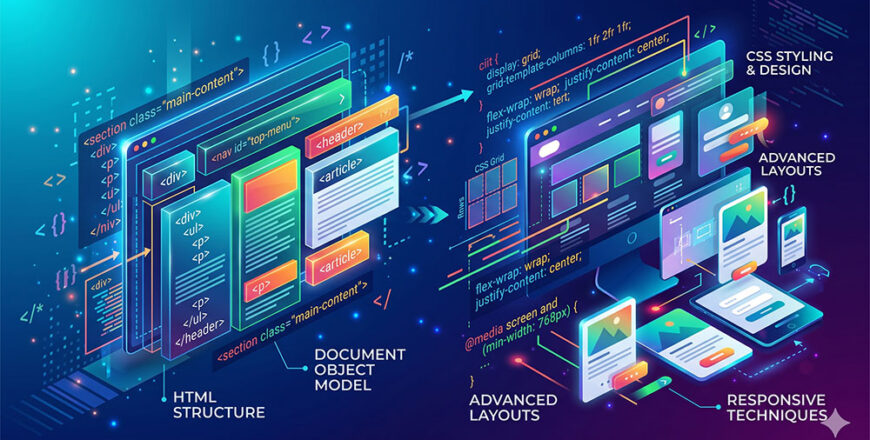
Welcome to Fullstack Web Development – Intermediate HTML and CSS, a deep-dive mastery program engineered by Generiss Academy. This course is 100% self-paced and entirely text-based. It is custom-built for independent developers who learn best by reading technical documentation, breaking down code structures, and executing syntax blueprints without the fluff or slow pace of traditional video lectures.

Moving beyond basic tags and simple inline styling, this course serves as your bridge to professional front-end architecture. You will dive deep into structural semantics, advanced responsive layouts, complex data tables, and dynamic form validation. On the styling side, you will move from static properties to fluid layout engines like CSS Grid and Flexbox, mastering fluid typography, customized layout variables, transitions, and performance-tuned animations.

Through highly organized text modules and meticulous source-code breakdowns, you will learn how to transform static concepts into responsive, pixel-perfect, accessible web interfaces that perform flawlessly across any modern browser.

Creative Commons Notice

This course description and its associated text-based syllabus material are licensed under a Creative Commons Attribution-NonCommercial-ShareAlike 4.0 International License (CC BY-NC-SA 4.0).

Module 2: Intermediate CSS Concepts
How does a "text-based" format work for intermediate styling?
Instead of forcing you to pause video players to read blurry lines of code, our platform serves as a highly organized, digital technical textbook. You read deeply documented architectural breakdowns, review clean markup schemas, and easily copy boilerplate code blocks directly into your IDE to test properties in real time.
Why study intermediate CSS when frontend frameworks exist?
Frameworks like Tailwind or Bootstrap are built on top of native CSS. Without an intermediate understanding of concepts like the CSS cascade, specificity, Flexbox sizing, and Grid alignment, debugging a layout issue in a framework becomes a guessing game. True mastery over native CSS makes you framework-agnostic.
Does this course cover web accessibility (a11y)?
Yes. Writing semantic code is the core foundation of digital accessibility. This intermediate course covers ARIA landmarks, screen-reader semantics, proper font sizing, keyboard focus navigation, and color contrast compliance.
Will I learn JavaScript in this course?
No. This course focuses entirely on mastering HTML and CSS layout mechanics. You will learn how to create advanced interactive components—like responsive navigation dropdowns, modal windows, and accordion tabs—using native HTML5 and CSS features without writing a single line of JavaScript.
What kind of layout projects will I build?
You will progress through text-guided layout blueprints, starting with multi-column financial data tables, moving to complex multi-step user registration forms with native validation, and concluding with a fully responsive, grid-driven multi-page portfolio site.
How do I troubleshoot issues or ask questions?
Even though the course is asynchronous, you are fully supported. Generiss Academy gives you access to a dedicated developer community forum. If a CSS element isn't centering or your layout breaks on mobile, you can paste your HTML/CSS code blocks there to receive text feedback from mentors and peers.
Do I get a certificate when I finish?
Yes. Once you complete the reading modules and pass the core layout challenges, you will earn an official Generiss Academy Certificate of Completion to showcase on your technical resume and LinkedIn profile.
Can I reference these modules after finishing the course?
Absolutely. Your enrollment includes permanent, lifetime access to the entire text archive. Many students keep our modules open in a browser tab while working to use them as an active syntax cheat sheet and component boilerplate library.

Course Duration

Because the curriculum is 100% self-paced, your absolute timeline is entirely up to your personal schedule:

  • Total Content Volume: Approximately 40 to 50 hours of technical reading modules, layout practice labs, and semantic code-structuring assignments.

  • Recommended Velocity: Investing 4 to 6 hours per week will allow you to comfortably digest the technical material and finish the framework pathway in 8 to 10 weeks.

  • Access Lifespan: Enrolling grants you lifetime access to all core text modules, allowing you to use the course material as a running code dictionary during your career.

Career Paths, Roles, and Opportunities

Mastering modern semantic layouts and advanced CSS layout mechanics is a non-negotiable baseline for any web professional. Completing this intermediate path opens doors to these technical areas:

Modern Job Roles
  • Front-End UI Developer: Specializing in transforming complex visual mockups into clean, responsive, and cross-browser-compatible semantic code.

  • Web Content Engineer: Managing structural semantics, accessible formatting, and layout styles across corporate content frameworks or major e-commerce platforms.

  • Junior UI Developer / Software Engineer: Working alongside JavaScript and backend engineers to build and maintain the responsive layout layers of web apps.

  • Freelance Web Designer: Creating custom, semantic, and highly performant landing pages and business sites for direct clients.

Current Salaries (UK & US)

Earning potential reflects competitive market evaluations for front-end specialists and web developers:

Region Experience Level Average Annual Salary Range United Kingdom (UK) Junior / Entry-Level £26,000 – £35,000 Mid-Level Specialist £40,000 – £65,000 Senior Layout Architect £70,000 – £90,000+ United States (US) Junior / Entry-Level $70,000 – $85,000 Mid-Level Specialist $90,000 – $120,000 Senior Layout Architect $130,000 – $155,000+
Get course
Available with Memberships
Buy Course
Share
Course details
Duration 45 hours
Lectures 31
Level Intermediate
Course requirements

To get the most out of this text-based progression, you should meet the following technical benchmarks:

  • Prerequisites: A solid grasp of fundamental HTML and CSS (e.g., basic tags, selectors, the box model, and simple page styling). No JavaScript knowledge is required for this course.

  • Hardware: A desktop computer or laptop (Windows, macOS, or Linux) capable of running standard web development software.

  • Software: A modern text editor or integrated development environment (IDE)—we strongly recommend Visual Studio Code—and a modern browser with developer tools (such as Google Chrome or Mozilla Firefox).

  • Internet Connection: A stable internet link to access our text modules, research web documentation (MDN), and complete text-guided layouts.

Intended audience

This curriculum eliminates passive video watching and is built for analytical, self-guided learners, specifically:

  • Self-Taught Beginners who know the absolute basics of HTML/CSS but feel stuck trying to build modern, professional layouts from scratch.

  • Backend Engineers who want to build polished, responsive front-ends for their apps without relying entirely on heavy, bloated CSS frameworks.

  • UI/UX Designers who want to bridge the gap between their design tools (Figma, Adobe XD) and production-ready, semantic web layouts.

  • Aspiring Front-End Developers looking for a structured, deeply technical text reference to solidify their foundational layout skills before moving on to JavaScript frameworks.